
As the year ends, a critical threat has emerged in the tech landscape. Consequently, we must issue a MongoBleed Vulnerability Alert to all our clients and readers. This severe security flaw, officially tracked as CVE-2025-14847, currently affects over 87,000 MongoDB servers worldwide. Therefore, understanding this risk is vital for protecting your sensitive data. Understanding the Critical CVE-2025-14847 Impact This specific vulnerability allows attackers to read server memory without any authentication. Essentially, cybercriminals can extract passwords, API keys, and other secrets remotely. They achieve this by exploiting a flaw in the zlib compression protocol. Unfortunately, this means your “secure” database might be leaking information right now. According to recent reports from BleepingComputer, exploitation is already active in the wild. Furthermore, this is not just a theoretical risk. The team at Wiz.io confirmed that 42% of cloud environments are potentially exposed. Thus, ignorance is not an option. Urgent Remediation Steps for Database Admins You must act immediately to secure your infrastructure. First, check if your MongoDB instance uses zlib compression. If it does, you are likely vulnerable. The most effective fix is to upgrade to the latest patched version released by MongoDB. However, if you cannot patch immediately, there is a temporary workaround. You should disable zlib compression in your configuration settings. This simple step stops the specific exploit path. Additionally, you should consult the CISA database for official federal guidance. For those using our managed services, please check our Logs for specific patch schedules. We also recommend reviewing our Services page to see how we handle such incidents. Future-Proofing Your Data Infrastructure Security is an ongoing process, not a one-time fix. After addressing the MongoBleed Vulnerability Alert, you should audit all your systems. Regular scans help identify hidden weaknesses. Tools from companies like Rapid7 can assist in this continuous monitoring. Moreover, consider how your applications handle data. Our MPCheck tool can help verify system integrity on mobile endpoints. Similarly, secure your web applications by exploring our Website Development standards. If you are unsure about your status, please Contact Us today. Our team is ready to assist you. Also, stay updated on our KlokHub platform for freelancer security tips. In conclusion, the MongoBleed Vulnerability Alert demands your full attention. By taking decisive action now, you prevent data loss. Stay vigilant and keep your systems updated.

Sustainable Data Centers: The 2025 Green Computing Imperative
The year 2025 will be remembered for massive AI adoption. However, this technological boom brought a hidden cost: unprecedented energy consumption. Today, December 23, the industry focus has shifted sharply toward sustainable data centers. We are no longer just building faster; we must build greener. This shift is essential for long-term viability and regulatory compliance. The Rise of Green Computing Infrastructure The global demand for computational power has tripled since 2023. Consequently, traditional facilities are struggling to cope ethically with the load. Modern sustainable data centers now utilize advanced green computing infrastructure to manage this demand. For example, liquid immersion cooling is finally becoming standard practice in new builds. This method significantly reduces electricity usage compared to traditional air cooling. Major providers like Google Cloud have recently committed to 24/7 carbon-free energy. This commitment sets a new industry benchmark that others must follow. Furthermore, the Uptime Institute now includes sustainability metrics in their tier standards. Alt Text: Interior view of sustainable data centers utilizing liquid cooling technology and renewable energy. Achieving Carbon-Neutral Data Storage Achieving truly carbon-neutral data storage is the next major hurdle for the sector. It involves more than just buying carbon offset credits. Modern facilities must integrate on-site renewable energy sources, such as rooftop solar arrays or wind turbines. Additionally, they use AI to optimize energy flow in real-time, matching workload to available green power. According to the International Energy Agency (IEA), these smart grids are crucial for future grid stability. Implementing Eco-Friendly Server Solutions How can your business adapt to these rapid changes? You need robust eco-friendly server solutions. At IT Touch, we help clients migrate their legacy systems to greener platforms. You can explore our cloud migration services to begin this necessary transition. We prioritize energy efficiency without sacrificing high performance. Furthermore, our IT consulting teams can audit your current footprint. We identify areas where energy is wasted. The Future is Sustainable Regulations are tightening globally regarding digital carbon footprints. Therefore, ignoring sustainability is now a significant financial risk. Read more about these upcoming regulations on our compliance insights blog. Investing in sustainable data centers is investing in your company’s future. For independent industry rankings on green performance, check out Greenpeace’s digital reports. Also, Data Center Dynamics offers excellent daily updates on green innovations. Contact our team via our about page to discuss your green strategy today.

Revolutionize Your App: Mastering UI Design Using ChatGPT
Are you building the next big freelance hire app? Great design is non-negotiable. It’s the first thing users notice. However, creating a stunning user interface (UI) can be challenging and time-consuming. But what if you could leverage artificial intelligence? Enter ChatGPT. This powerful tool is changing the game for developers and designers. Consequently, mastering UI design using ChatGPT can give your project a serious competitive edge. Let’s explore how you can use this AI to build a truly intuitive freelance app. The New Era of AI in UI/UX Design AI is no longer just a buzzword. It’s a practical tool that is reshaping creative industries. For UI/UX design, AI tools like ChatGPT act as a powerful assistant. They help designers overcome creative blocks and accelerate their workflow. For instance, designers can brainstorm ideas much faster. This allows for more innovation and less time spent on tedious tasks. According to a McKinsey report, generative AI is set to add trillions to the global economy, with significant impacts on product design and development. This shift means that understanding AI in UI/UX design is becoming essential. For more insights on our design philosophy, check out our services page. Practical UI Design Using ChatGPT for Your App So, how can you actually apply this technology? Using ChatGPT for UI design is surprisingly straightforward. It can assist in several key stages of the design process, from initial concepts to final touches. Generating User Personas and Flows with AI Before you design a single screen, you need to understand your users. ChatGPT can help you create detailed user personas for your freelance app. For example, you can prompt it to create a persona for a “freelance writer looking for short-term projects.” Afterwards, you can ask it to map out a complete user flow, from signing up to applying for a job. This ensures your design is user-centric from the start. To learn about our process, visit our about us page. Crafting Compelling Microcopy and Content Words matter in UI. The text on your buttons, in your error messages, and on your loading screens is called microcopy. Good microcopy guides the user effortlessly. ChatGPT is excellent at generating clear and concise microcopy. Instead of “Error 404,” it can suggest “Oops! We can’t seem to find that page.” This small change significantly improves the user experience. Great content is at the heart of design, a principle discussed by UX experts at Nielsen Norman Group. Assistance with ChatGPT for Wireframing While ChatGPT can’t create visual designs directly, it can help structure them. You can use ChatGPT for wireframing by asking it to describe the layout for a specific screen. For instance, prompt it: “Describe the UI components for a freelancer’s profile screen on a mobile app.” It will list elements like a profile picture, name, rating, skills tags, and a portfolio section. This text-based blueprint helps you or your designer build the visual wireframe much faster. Many designers use tools like Figma or Sketch to bring these ideas to life. If you’re looking for inspiration, our portfolio has some great examples. Finding a Designer Skilled in AI Tools Ready to bring your vision to life? You need a designer who understands modern tools. A designer skilled in freelance UI designer AI tools can work more efficiently and creatively. They can integrate tools like ChatGPT into their process to deliver better results, faster. Building a complex app requires expertise, as platforms like Smashing Magazine often highlight in their case studies. On a freelance platform—the very kind you might be building—you can specifically look for designers with these skills. When you’re ready to hire, you can contact us for a consultation. Or, if you prefer to read more on the topic, our blog is full of helpful articles. Ultimately, integrating UI design using ChatGPT into your workflow is a smart move. It streamlines the creative process, enhances user experience, and helps you build a better freelance hire app.
MPCheck’s Version 1102 Update
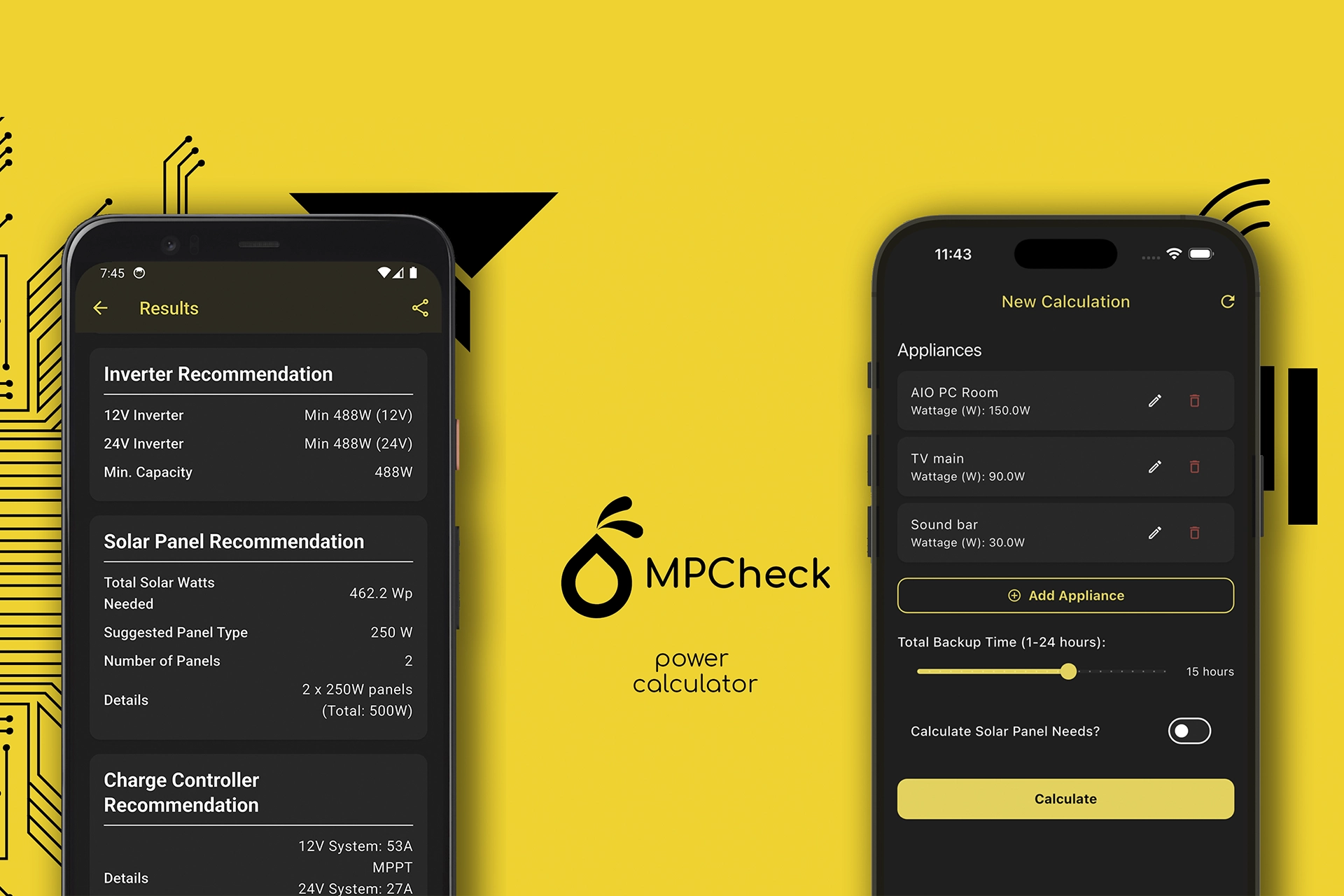
We’re thrilled to announce a significant update to the MPCheck app that’s all about enhancing your user experience and making your power calculations smarter and more efficient. The latest release, MPCheck’s version 1102 update, introduces two fantastic features that we know you’re going to love: a beautiful new shimmer loading effect and the highly-requested ability to save your projects. We’ve listened to your feedback and have been hard at work to bring you an app that not only functions flawlessly but also feels great to use. Let’s dive in and explore what’s new! A Touch of Elegance: The New Shimmer Loading Effect Have you ever tapped a button and been left staring at a static loading spinner, wondering if the app is still working? We wanted to get rid of that feeling entirely. With our latest update, we’ve introduced a subtle but beautiful shimmer loading effect that provides a modern and visually engaging way to see that your content is on its way. Instead of an abrupt spinner, you’ll now see a soft, sweeping highlight that glides over the content area, giving you a clear and elegant indication that the app is fetching your data. This isn’t just about looking good; it’s about creating a smoother, more seamless user experience. The shimmer effect lets you know that something is happening in the background without being distracting. It’s a small touch, but it makes the app feel more polished, professional, and responsive. We believe that a great user experience is made up of these small details, and we’re confident that this new loading animation will make your interactions with MPCheck more enjoyable. Plan Smarter, Not Harder: Introducing the Save Projects Feature This is the big one. We know that many of our users, from DIY enthusiasts to professional installers, often work on multiple projects at once or need to refer back to previous calculations. Until now, you had to re-enter all your appliances every time you wanted to run a calculation. With the MPCheck’s version 1102 update, that’s a thing of the past. We are excited to introduce the Save Projects feature! You can now group all the appliances for a specific setup—like a living room, a workshop, or an entire off-grid cabin—and save it as a named project. This means you can create a project, save it, and come back to it anytime to review, edit, or recalculate. Imagine you’re planning a solar setup for a client. You can create a project with all their appliances, run the calculations, and save it. If the client wants to add another appliance later, you can simply open the project, add the new item, and recalculate in seconds. This feature is a game-changer for anyone who needs to manage multiple power consumption scenarios. It saves you time, reduces errors, and keeps all your important calculations organized and accessible right within the app. We’re incredibly proud of these new features and believe they make MPCheck an even more powerful tool for all your power calculation needs. Head over to the App Store or Google Play to get the latest update and try them out for yourself! Get ready for a major upgrade! We’ve listened to your feedback and rebuilt parts of the app to make your workflow smoother, faster, and more reliable. ✨ A Touch of Elegance: Shimmer Loading You’ll immediately notice a more polished and modern feel. We’ve replaced old loading spinners with a sleek shimmer effect across the app. This makes loading data feel more responsive and seamless, giving you a much more pleasant user experience while you work. 💾 Never Lose Your Work Again: Save Project Features! This is the big one you’ve been asking for! You can now save your project features at any stage of your check. 🐛 Bug Fixes & Performance Boosts Of course, we’ve also been busy squashing bugs and making performance improvements under the hood. This update includes: We’re incredibly excited for you to try this new version. Thank you for your continued support and feedback!

The Life Cycle of a Domain Name: A Guide for Every Website Owner
Understanding the domain name life cycle is crucial for any business owner, developer, or digital marketer. Your domain name is more than just an address; it’s the foundation of your online identity. Losing it can mean lost traffic, damaged brand credibility, and a significant setback for your business. This journey from a new idea to a registered address and potentially back to availability follows a predictable path. Let’s explore each stage of The Life Cycle of a Domain Name so you can manage your digital assets effectively and avoid costly mistakes. Stage 1: Availability and Registration Every domain name begins its journey as an idea. The first stage is Availability. This is when a domain name has not been registered by anyone and is available for purchase on the open market. You can use a domain registrar, like Krustylab, to search for your desired name. If it’s available, you can register it for a specific period, typically ranging from one to ten years. This registration gives you the exclusive right to use that name. During this phase, it’s vital to choose a name that is memorable, relevant to your brand, and easy to spell. Once you complete the payment and provide your contact information (known as WHOIS data), the domain is officially yours! Stage 2: The Active Period This is the longest and most stable phase of a domain’s life. Once registered, your domain is Active. During this period, you have full control. You can point it to your website’s hosting server, create custom email addresses (like hello@yourbrand.com), and configure its DNS settings. Your primary responsibility during the active period is to ensure you renew it before the expiration date. To prevent any accidental loss of your domain, it is highly recommended to enable the auto-renewal feature. This simple step ensures your domain remains yours without any interruption to your website and email services. Stage 3: Expiration and the Grace Period If you don’t renew your domain by its expiration date, it doesn’t immediately become available to the public. Instead, it enters the Expired stage. Your website and email will stop working, but you still have a chance to get it back easily. This window is called the Registrar Grace Period, which typically lasts from 30 to 45 days, depending on the registrar and the domain extension (.com, .ng, etc.). During this grace period, the original owner can usually renew the domain at the standard renewal price without any extra penalties. It’s a safety net, but you shouldn’t rely on it. Stage 4: Redemption and Pending Deletion If you fail to renew the domain during the grace period, things get more serious and expensive. The domain enters the Redemption Period, which usually lasts for 30 days. In this stage, the domain has been removed from your account, but you are still the only one who can retrieve it. However, recovering it now requires paying a much higher redemption fee in addition to the standard renewal cost. This fee can often be over ten times the price of a regular renewal. Following the redemption period, the domain moves into a short Pending Deletion phase for about five days. At this point, the domain is locked, and it cannot be recovered or renewed by anyone. Stage 5: Release and Re-Registration After the pending deletion phase, the domain is officially deleted from the registry. It is then released back to the public and becomes available for registration on a first-come, first-served basis. Anyone can now register it as if it were a brand-new domain. Valuable expired domains are often snatched up instantly by individuals or companies using automated services in a practice known as “drop catching.” Losing your domain at this stage means you risk a competitor or a bad actor taking over your online identity. Managing your renewals properly is the only way to safeguard your digital brand and stay in control throughout The Life Cycle of a Domain Name.

Your Guide to a Fast KlokHub Signup: Land Your Next Client Today
Are you ready to showcase your skills to high-quality clients? Finding great projects is the goal for every talented freelancer. However, cutting through the noise on crowded platforms can be frustrating. This is where KlokHub makes a difference. The platform is designed to connect skilled professionals like you with serious businesses. Therefore, the first step to unlocking these opportunities is the KlokHub signup process. Why Complete the KlokHub Signup Process? Joining another platform might feel like a hassle, but KlokHub is different. First, it focuses on quality over quantity. This means you will connect with vetted clients who value professional work. Secondly, the platform ensures your financial security. With a secure payment system, you can focus on your craft without worrying about invoices. Completing the KlokHub signup is your entry ticket to a more professional and reliable freelance experience, which is vital according to the latest freelance trends in 2025. Start Your KlokHub Signup Now Your Step-by-Step Freelancer Registration Guide We have made the KlokHub signup process simple and intuitive. You can get your profile ready in just a few steps. Follow this guide to get started. Step 1: Initial Registration First things first, head over to the official registration page. You will need to provide basic information like your name and email. This part is quick and gets your account created instantly. This is the official starting point for every freelancer joining our community. Sign up here: https://klok.krustylab.com/provider/auth/sign-up Step 2: Create a Compelling Profile Your profile is your digital storefront. Consequently, making it impressive is crucial. Step 3: Set Your Skills and Rates Finally, define your skills and set your desired rates. Be specific about your expertise, as this helps our algorithm match you with the right projects. Researching how to determine your freelance rate can be very helpful. Once this is done, your profile is ready for review. Sign Up as a Freelancer After Your KlokHub Signup: What’s Next? Once your profile is approved, you can start browsing projects and receiving invitations from clients. To maximise your success, always respond promptly and professionally. Keep your portfolio updated with your latest work. As a company that values great UI/UX design, we know a polished profile makes a huge difference. For managing your new income stream, consider tools like Wave Financial to track your earnings. Our team at KrustyLab is committed to building tools that empower professionals, a mission you can read about on our About Us page. In conclusion, the KlokHub signup is a small investment of your time that can lead to significant career opportunities. Your next big project is waiting. If you have any questions, feel free to contact our team. Join KlokHub Today!

KlokHub: The Future of Hiring Freelancers is Here
Finding the right freelance talent can be challenging. You need skilled professionals who are reliable and fit your budget. However, navigating traditional freelance marketplaces often feels like a chore. That is precisely where KlokHub steps in. It’s the freelance hire app service designed for efficiency, speed, and quality. Consequently, businesses can now connect with a global talent pool right from their smartphones. Why Your Business Needs the KlokHub App The modern workforce is increasingly flexible. Businesses need tools that adapt to this new reality. For instance, KlokHub provides direct access to vetted professionals across hundreds of categories. This app isn’t just another listing service; it’s a comprehensive ecosystem for getting work done. We understand the technology behind powerful platforms because we build them through our app development services. Therefore, we can recognize a truly game-changing tool when we see one. Find Freelance Talent Effortlessly with KlokHub Gone are the days of sifting through countless unqualified proposals. Instead, KlokHub uses an intelligent matching algorithm to connect you with the best candidates. Users can easily browse portfolios and review past work. This ensures you hire skilled professionals who align with your project’s vision. The growth of the gig economy shows that on-demand talent is not just a trend, but a fundamental business shift. KlokHub is at the forefront of this movement. Seamless Project Management within KlokHub Hiring is just the first step. Afterwards, you need to manage the project effectively. KlokHub integrates powerful tools directly into the app. You can communicate with your freelancer, share files, and track milestones without ever leaving the platform. This centralized approach simplifies workflow, much like tools such as Asana do for in-house teams. Furthermore, this streamlined process is crucial for success, a key principle in managing remote teams. KlokHub: A Platform Built on Trust and Security Trust is essential when working with remote talent. KlokHub builds this trust through a secure and transparent system. All payments are handled through a protected escrow service. This means funds are only released when you are 100% satisfied with the work delivered. With the global freelance market reaching staggering figures according to Statista, secure platforms are more important than ever. Our own commitment to transparency is reflected on our About Us page. Get Started with the KlokHub Freelance App Embracing the future of work is simple with KlokHub. In conclusion, KlokHub empowers you to build a dynamic and skilled team on demand. It’s an essential tool for any modern business looking to innovate and grow. For more insights on building great digital products, you can see our work and see the standards we uphold. If you have questions, feel free to contact us. Ready to hire your next top performer? Download KlokHub today and connect with professionals on the world’s most intuitive freelance hire app. For additional professional networking, LinkedIn remains a valuable resource, and for insights into remote work culture, check out Remote.co.